'%3e%3cpath%20d='M484.593,504.085h-4.675v-4.007c-1.24,2.671-4.151,4.818-8.778,4.77-8.348-.048-10.495-6.106-10.495-11.5V478.133h4.961v14.073c0,4.675,1.813,8.015,6.918,8.015,4.866-.048,7.108-3.149,7.108-7.585v-14.5h4.961Z'%20transform='translate(945.238%20905.834)%20rotate(180)'/%3e%3cpath%20d='M664.575,500.208h-4.961v-4.532c-1.813,3.483-5.534,5.3-9.636,5.3-8.349,0-13.31-6.488-13.31-13.739,0-7.919,5.772-13.739,13.31-13.739,5.152,0,8.443,2.863,9.636,5.343v-4.58h4.961Zm-22.946-12.88a8.91,8.91,0,0,0,9.064,9.016,8.483,8.483,0,0,0,8.062-5.152,9.758,9.758,0,0,0,.906-3.864,8.249,8.249,0,0,0-.763-3.864,8.663,8.663,0,0,0-8.3-5.343,8.879,8.879,0,0,0-8.969,9.16Z'%20transform='translate(-147.893%20-72.507)'/%3e%3cpath%20d='M864.959,500.208H860v-4.532c-1.813,3.483-5.534,5.3-9.637,5.3-8.348,0-13.309-6.488-13.309-13.739,0-7.919,5.772-13.739,13.309-13.739,5.152,0,8.444,2.863,9.637,5.343v-4.58h4.961Zm-22.946-12.88a8.91,8.91,0,0,0,9.063,9.016,8.484,8.484,0,0,0,8.063-5.152,9.76,9.76,0,0,0,.906-3.864,8.251,8.251,0,0,0-.764-3.864,8.662,8.662,0,0,0-8.3-5.343,8.879,8.879,0,0,0-8.968,9.16Z'%20transform='translate(-316.255%20-72.507)'/%3e%3cpath%20d='M1046.421,421.3h4.961v34.186h-4.961Z'%20transform='translate(-491.768%20-27.782)'/%3e%3cpath%20d='M1107.028,487.185a13.716,13.716,0,1,1,0,.048Zm4.961.1a9.09,9.09,0,1,0,0-.048Z'%20transform='translate(-543.082%20-72.507)'%20fill='%23379ff8'/%3e%3cpath%20d='M1291.167,487.185a13.716,13.716,0,1,1,0,.048Zm4.961.1a9.09,9.09,0,1,0,0-.048Z'%20transform='translate(-697.793%20-72.507)'%20fill='%23379ff8'/%3e%3cg%20transform='translate(564.344%20388.045)'%3e%3cpath%20d='M1118.575,388.045v2.624c0,2.528,1.479,2.862,4.2,2.862h13.2c3.912,0,6.2,3.339,6.917,4.58a6.408,6.408,0,0,1,6.344-4.58h13.243c2.862,0,4.2-.334,4.2-2.862v-2.624h3.912v4.818c0,3.387-2,5.773-6.345,5.773H1151c-3.435,0-4.866,2.242-5.582,4.293h-5.152c-.239-1.67-2.052-4.293-5.868-4.293H1120.96c-4.341,0-6.249-2.385-6.249-5.773v-4.818Z'%20transform='translate(-1114.711%20-388.045)'/%3e%3c/g%3e%3cg%20transform='translate(589.681%20427.701)'%3e%3cpath%20d='M1273.917,642.081h-5.2v-6.2h5.2Z'%20transform='translate(-1268.717%20-635.879)'/%3e%3c/g%3e%3c/g%3e%3c/svg%3e)
Expense reporting without chasing receipts
Centralize expense reports, approvals and controls in one place. AI does the manual work for you.
- Upload from your phone
- Automatic AI reading
- Approvals and control

Photo capture
Snap a photo of the receipt or invoice and the expense report builds itself on mobile.
Automatic AI reading
AI extracts amount, date, vendor, currency and taxes with zero typing.
Policies and limits
Set limits by expense type, team and country, and validate every expense automatically.
Multi-step approvals
Approval flows by hierarchy, with reminders and full traceability.
Advances and reimbursements
Assign advances, track balances and settle reimbursements without spreadsheets.
Reports and export
Dashboards by category, team and period, ready to export to your accounting system.
From a receipt to an expense ready to manage
We connect the person who spends with the people who need to control, approve and manage it.
Report from anywhere
Take a photo of the receipt or upload it from your phone.
Automate data entry
AI identifies the key data and removes manual typing.
Apply your policies
Control amounts, categories, receipts and rules defined by your company.
Approve faster
Every expense automatically follows the right approval flow.
A complete expense report in a few steps
You make the expense
The employee pays for an expense related to their work.
You upload the receipt
Take a photo or attach the file from your phone.
We read the information
AI automatically identifies vendor, date, amount, taxes and other relevant data.
We validate the rules
The expense is checked against the policies and conditions set by the company.
It goes to approval
The report is automatically routed to the right approver.
Ready to manage
Everything is centralized for reconciliation, accounting, reimbursement or payment.

AI does the manual work for you
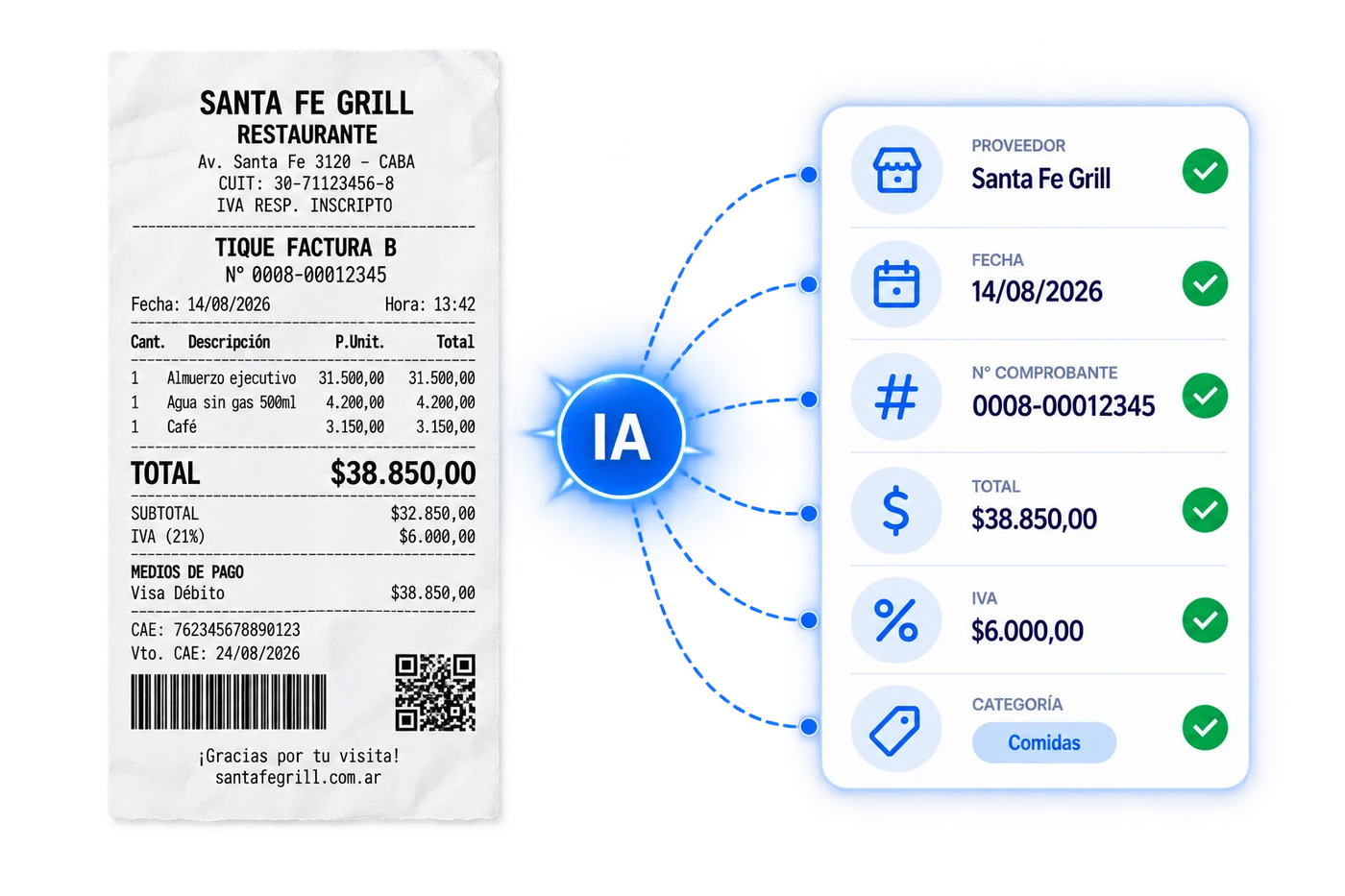
Stop typing in the data from tickets, invoices and receipts one by one.
We read the documentation and turn every receipt into structured information so the process can continue automatically.
Detects and extracts
Your policies stop living in a PDF
Turn internal expense policies into rules applied on every single report.
You can define controls by
Policy matrix
| Expense type | Time window | Days | Amount range |
|---|---|---|---|
| Meals | 12:00 – 3:00 PM | Mon to Fri | Up to $70 |
| Dinners | 8:00 – 11:30 PM | Mon to Thu | Up to $85 |
| Transport / Taxi | 6:00 AM – 11:00 PM | Mon to Sat | Up to $35 |
| Fuel | 00:00 – 23:59 | Every day | Up to $120 |
| Hotel | Check-in 2:00 PM | Mon to Sun | Up to $250 / night |
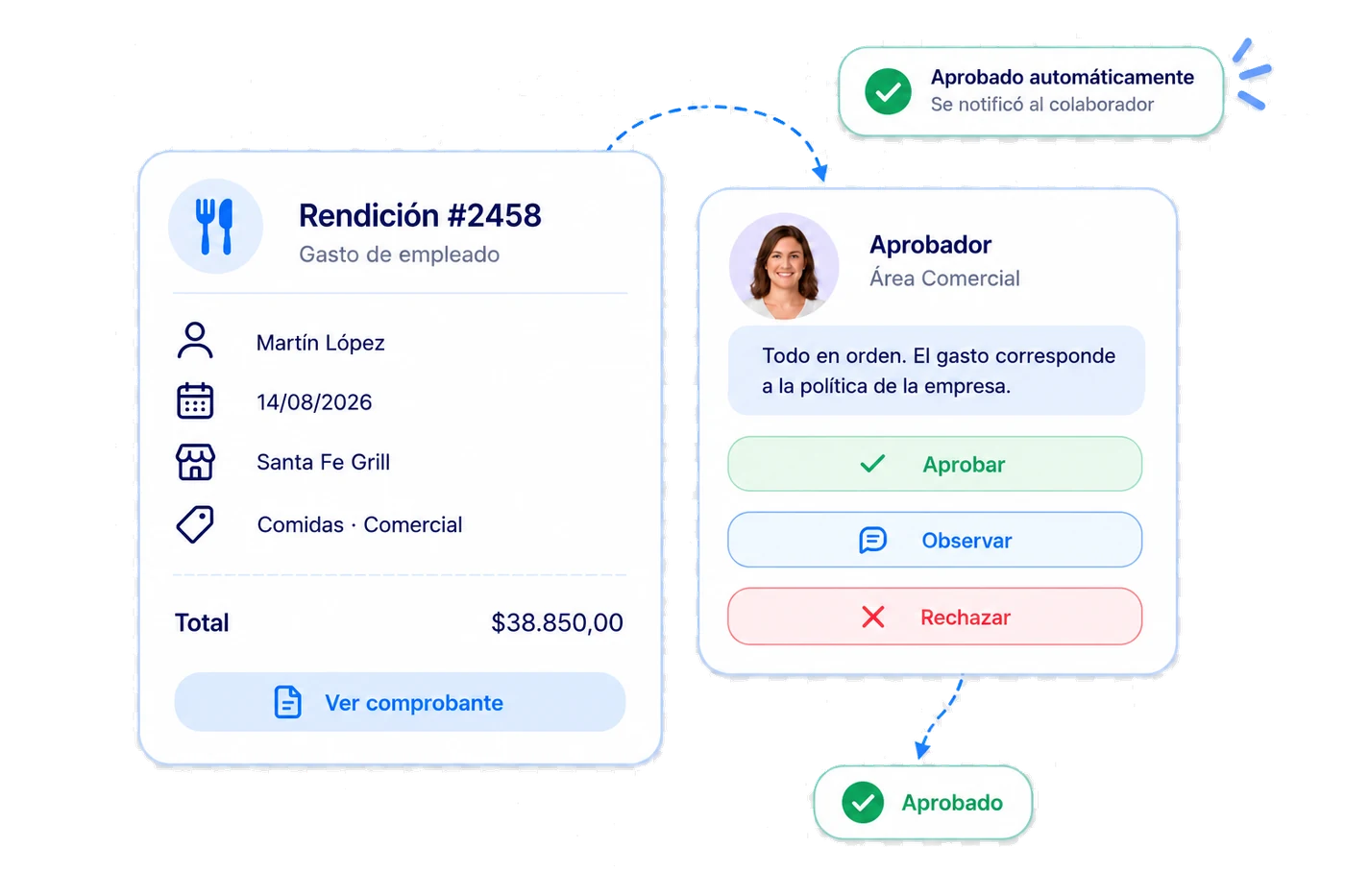
Every expense, to the right approver
Define your approval flows and Naaloo automatically routes each expense report to the right person.
Custom flows
Set approvals by department, amount or expense type.
Simple decisions
Approve, flag or reject every report from one place.
Automatic tracking
Everyone knows the expense status without emails or messages.
Submitting an expense should be this simple
From anywhere, whenever they need it. Employees upload their receipt from their phone and Naaloo guides them through the whole expense report, with no paperwork or complicated processes.
From their phone they can:
- Take a photo of the receipt
- Create and review their expense reports
- See and reply to comments
- Fix information
- Track approval status
- Check their reimbursements
Simple for employees. More order for Finance.


Advances and expenses, finally connected
Manage cash advances given to employees and match them automatically against the expenses they report afterwards.
To be returned to the company
All company spending in one place
While the employee gets a simple experience, Finance gains control over the whole operation.
Monthly spending
$18.4M
Pending approval
24
Out of policy
7
Missing receipt
12
Reconciled
94%
Spending by category
- Travel28%
- Transport23%
- Meals19%
- Entertainment14%
- Supplies10%
- Other6%
Monthly spending trend
Expense report status
- Approved78%
- Under review15%
- Out of policy7%
Much more than an expense app
Expense reports
Upload and track expenses.
Artificial Intelligence
Automatic receipt reading.
Policies
Custom rules and controls.
Approvals
Automatic flows for each organization.
Advances
Delivery, reporting and control of funds.
Reconciliation
Match expenses, receipts and transactions.
Less admin. More control.
For employees
A simple way to report expenses without spreadsheets or paper.
For managers
Fast approvals and visibility over their team.
For Administration
Less manual work and fewer errors.
For Finance
Control over spending, policies and reconciliation.
For the company
Centralized, traceable information.

Frequently asked questions
Yes. The employee takes a photo of the receipt or attaches the file and the report is created instantly.
Yes. AI identifies vendor, date, amount, taxes, currency, category and receipt number.
Yes. Rules are configured by expense type, amount, category, department, cost center, user, project or receipt type.
It is flagged automatically and can be blocked, questioned or routed to an exception approval flow.
Yes. You record the advance and it is matched against reported expenses to get the balance to return or top up.
Yes. From their phone they can see approval status, comments and reimbursements.
Ready to leave expense spreadsheets behind?
Digitize expense reporting, automate controls and give Finance visibility over the entire process.

Mooni AI
✨ Available 24/7Hi 👋 I'm Mooni. I'm here to answer questions, automate tasks and work alongside your team.